

Autopilot Sponsorship in 2026: Simple Steps for Steady Donor Support
Gratona
Autopilot sponsorship uses AI and software to automate donor management, making it easier for nonprofits to handle tasks like payment processing, email communication, and donor retention. By automating repetitive processes, organizations can save time, increase revenue, and improve donor engagement. Tools like HelpYouSponsor streamline these workflows, offering features such as automated emails, payment tracking, and donor insights. Here's how you can set up and optimize your sponsorship program:
- Automate Communication: Use pre-set email triggers for welcome messages, payment receipts, and renewal reminders.
- Track Donor Data: Monitor donations, identify trends, and act on insights to retain donors.
- Leverage AI Tools: Use AI analytics to predict giving patterns and personalize outreach.
- Simplify Payments: Integrate with platforms like PayPal and credit card processors.
- Grow with Flexible Plans: Start with free options or scale up as your program expands.
Automation helps nonprofits focus on impactful work while maintaining steady donor support. Programs using these methods have reported increased revenue, improved retention rates, and reduced administrative costs.
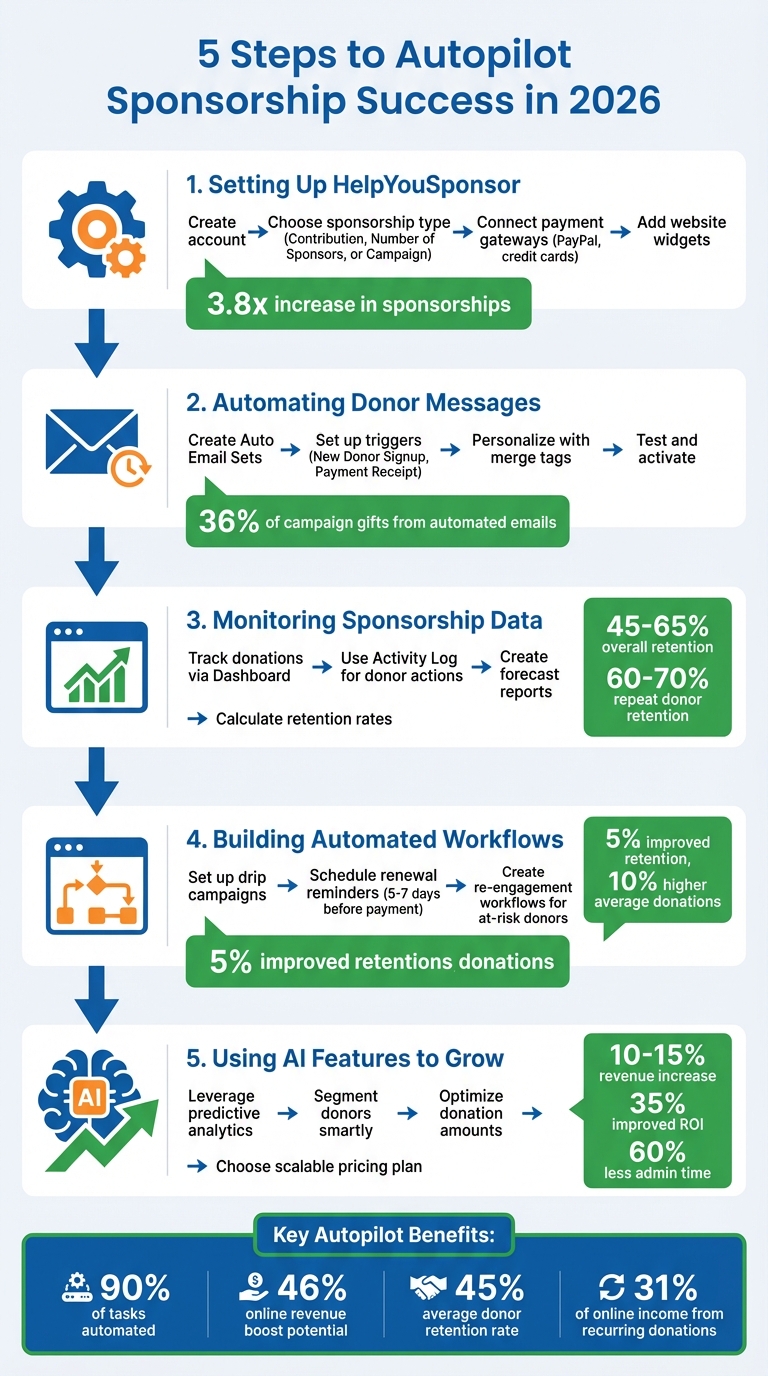
5-Step Guide to Automating Nonprofit Sponsorship Programs with AI
How to Automate Many Parts of Your Non-Profit Today!
Step 1: Setting Up HelpYouSponsor
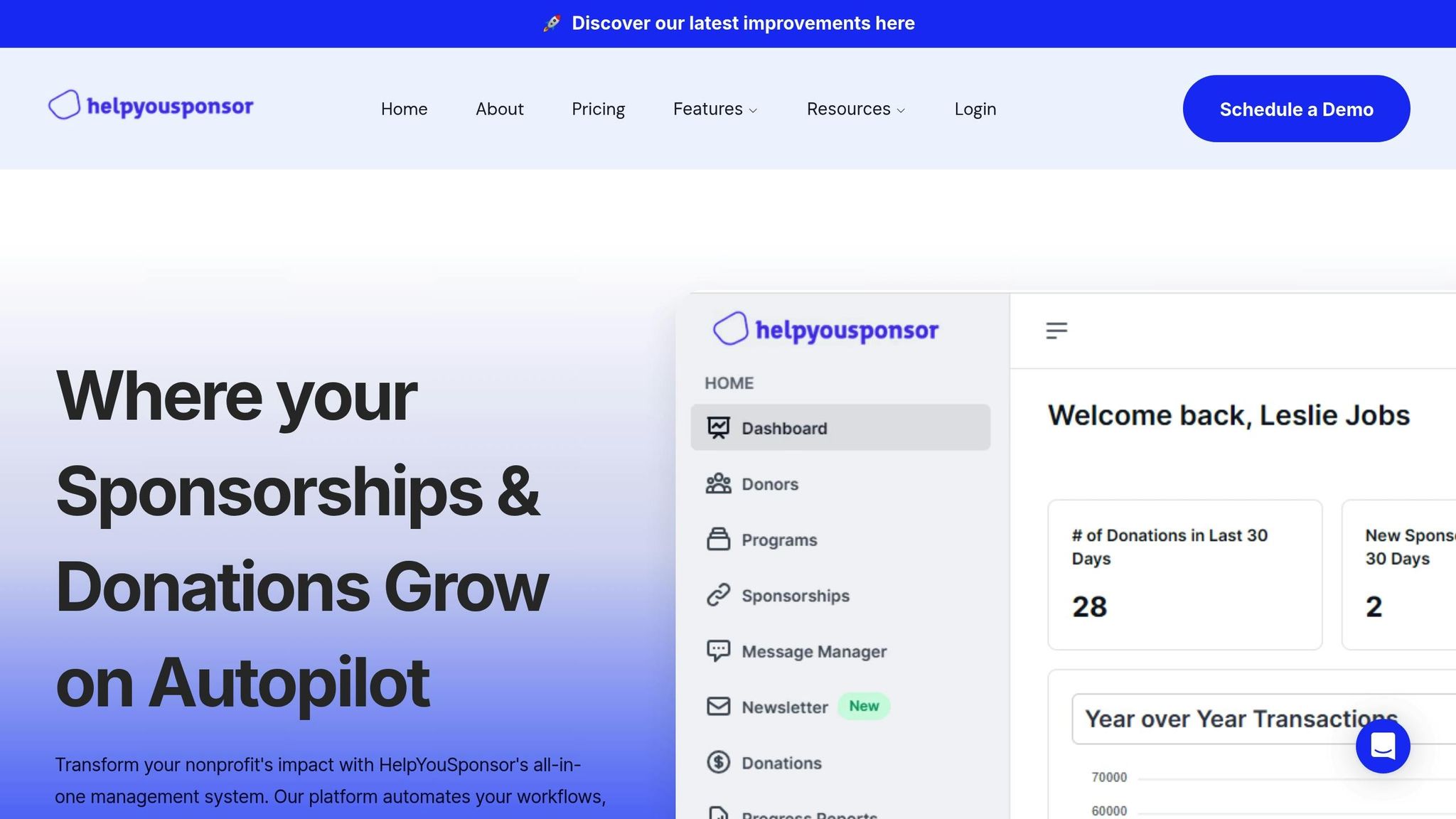
Getting started with HelpYouSponsor involves two main steps: setting up your account and connecting payment gateways. The platform comes with pre-designed sponsorship programs, such as "Child Sponsorship" and "General Campaign". Once these are set up, you can move forward to automating donor communications in the next phase.
Creating Your HelpYouSponsor Account
When you sign up, you'll gain access to default programs that you can tailor to your needs. Start by creating a recipient program, applying settings, designing forms, configuring automated emails, and adding recipients. To begin, go to the "Recipients" section in the main menu and click "Create a program." Here, you'll choose one of three sponsorship types:
- Contribution: Funding based on a specific threshold.
- Number of Sponsors: Allows multiple donors per recipient.
- Campaign: Designed for general cause donations.
Once your program is fully configured, a green checkmark will appear next to its name, signaling that it's ready to accept donations.
Connecting Payment Gateways
HelpYouSponsor integrates with PayPal and credit card processors to manage recurring donations. To connect these, navigate to "Settings" and then "Integrations" in the main menu. If your preferred gateway isn’t supported, you can use the "External Processor" option to track donations manually. Additionally, you can log payments made via checks, cash, or wire transfers, ensuring all your financial data stays organized in one place by moving sponsorship management from spreadsheets to software. For added convenience, the platform syncs with QuickBooks, streamlining your accounting tasks.
Adding Sponsorship Displays to Your Website
HelpYouSponsor makes it easy to showcase live recipient profiles directly on your website. These embeddable widgets include photos, ages, locations, and other details, along with a "Sponsor Now" button that links visitors to the donation form. To add these widgets, go to "Widgets & Website Integration" to copy the widget code, then embed it into your site. Any updates made to recipient information in HelpYouSponsor will automatically reflect on your website widgets. Organizations using this feature have reported a 3.8x increase in sponsorships.
Step 2: Automating Donor Messages
With your account now set up, it's time to streamline donor communications. HelpYouSponsor makes this easy with its Auto Email Sets, which allow you to manage all automated email triggers from one place. To get started, head to the "Auto Emails" section in the Communications menu and select "Create Auto Email Set". Name your set and specify a "From Email Address", which will appear as the sender for all emails in that set.
The platform provides built-in triggers to automatically send emails based on specific actions. For instance, the "New Donor Signup" trigger sends a welcome email as soon as someone joins your program, while the "Donor Payment Receipt" trigger delivers a thank-you message and payment confirmation immediately after a donation. To make these messages more personal, you can use Short Codes (also called Merge Tags) to include details like donor names, recipient names, or program-specific information. For example, inserting en_child_name will automatically display the sponsored child's name in the email. This automation ensures that every donor interaction is handled efficiently and thoughtfully.
Creating Automated Welcome Messages
Once your Auto Email Set is created, you can customize the subject line and email content using merge tags. Use the "Test Email" feature to preview the formatting and make sure everything looks right. HelpYouSponsor offers three categories of merge tags: Recipient Short Codes (data from recipient profiles), Donor Short Codes (data from donor profiles), and Additional Short Codes (system-provided variables). Be sure to use only the tags supported for each specific email type - unsupported tags will prevent the email from being saved.
When you're happy with the email content, attach the Auto Email Set to your sponsorship program software. Go to Programs, click the Settings icon, and navigate to the "Emails" tab to select and link the set. Automation won’t activate until this step is completed.
Sending Automatic Receipts and Thank-You Notes
The "Donor Payment Receipt" trigger ensures donors receive an immediate thank-you and confirmation after each successful donation. Like the welcome messages, these emails can be personalized with merge tags to make them feel more meaningful and less generic.
To keep things running smoothly, monitor the status of each automated email. Emails will display a status tag such as "Completed" (fully set up and ready to send), "Warning" (indicating missing elements like short codes), or "Email Disabled" (preventing the email from being sent even if triggered).
Automated email campaigns can have a powerful impact. Organizations using these tools report that automated emails can account for up to 36% of total campaign gifts. Additionally, nonprofits leveraging AI-driven communication tools have seen donor retention rates increase by as much as 49%. By automating these routine touchpoints, your team can focus on fostering deeper connections with donors while leaving the repetitive tasks to the system.
Step 3: Monitoring Sponsorship Data
Once you've automated donor communications, the next step is keeping an eye on the data. HelpYouSponsor offers tools that make tracking donor activity and monitoring program performance more manageable.
Start with the Dashboard, where you'll find an overview of your donations and sponsorships from the past 30 days. This includes Statistical Cards for quick insights and a Donations Graph that charts contributions over the last three years. This visual tool helps you identify trends, like seasonal spikes or steady growth, at a glance.
The Activity Log is another valuable feature. It captures every donor action, from payments and profile updates to failed transactions. You can filter these records by categories like "Commitments" to pinpoint specific actions, such as "Added Sponsorships". This is especially useful for catching failed payments early, allowing you to reach out to donors before they disengage.
Creating Donation Forecast Reports
HelpYouSponsor's Analytics Suite takes donor data to the next level by helping you anticipate future trends. By analyzing three years of transaction history, you can uncover patterns in recurring donations. To ensure the most accurate forecasts, keep your donor database clean - remove duplicate entries weekly and update contact information regularly.
"While reporting tells you what happened, analytics tells you what might happen next." - HelpYouSponsor
With the HYS AI (Beta) feature, forecasting becomes even easier. You can ask natural language questions like, "What was our total revenue last quarter?" or "How many recipients are in the Children's Education program?" and receive instant answers. This feature is a game-changer when preparing for board meetings or drafting grant applications.
For deeper insights, group donors into categories such as New, Regular, Big, or Past. This allows you to predict donation increases and set donor retention goals - aim for 45–65% overall retention and 60–70% for repeat donors. Organizations using predictive analytics in fundraising have reported online revenue boosts of up to 46%.
Beyond spotting trends, it’s important to measure donor loyalty directly.
Measuring Donor Retention Rates
Understanding donor retention is key to building long-term support. Retention rate is calculated as:
(recurring donors this year / total donors last year) x 100.
The industry average sits at around 45%, but you should aim for higher benchmarks: 20–30% retention for first-time donors and 60–70% for repeat donors.
"You can't perfect what you can't measure! But, by evaluating your fundraising with several KPIs, you can develop a well-rounded understanding of your fundraising success." - Jack Showers, Nonprofit Research Analyst, KIT
Use HYS AI to identify donors at risk of dropping off. For example, you can ask, "How many sponsors in the [Program Name] haven’t interacted in six months?". With this insight, you can launch targeted re-engagement campaigns. UNICEF Australia used similar AI-driven insights to great effect, raising 26% more net revenue, improving campaign ROI by 35%, and saving $30,000 by cutting unnecessary mailings.
Another metric to track is Donor Lifetime Value (LTV), which measures the long-term financial impact of each donor. Calculate this by multiplying the average number of years a donor stays engaged by their average donation amount and frequency. High-LTV donors deserve extra attention, as their contributions can significantly impact your organization.
Finally, remember that donor information changes by roughly 30% each year. Regularly clean your data to ensure your retention calculations remain accurate. The Recent Transactions section on your Dashboard provides real-time updates on payment statuses, helping you quickly address any issues that could affect retention.
Step 4: Building Automated Donor Workflows
Once you've gathered detailed data insights, the next step is to automate donor interactions to keep them engaged without overloading your team. HelpYouSponsor simplifies this process with its Auto Email Sets, found under the Communications menu. These automated workflows send messages triggered by specific actions, such as New Donor Signup, Donor Payment Reminder, Donor Payment Receipt, or Notify Sponsor of Profile Update. To make sure these emails reach the right audience, link each Auto Email Set to the appropriate sponsorship program, like Child Sponsorship or General Campaign, in your program settings.
Before launching, test each workflow using the Test Email feature. This ensures that merge tags pull the correct information and that email layouts look as intended. You can also check the Auto Email page for status updates like 'Completed,' 'Warning,' or 'Email Disabled' to make sure everything is running smoothly.
Setting Up Email Drip Campaigns
Email drip campaigns are an excellent way to keep donors engaged by sharing updates about their contributions over time. With HelpYouSponsor, you can personalize these emails using merge tags to include recipient names, donor details, and program-specific information. This adds a personal touch while scaling your outreach.
Structure your campaigns to align with personalized donor journeys. For instance:
- Send a welcome email immediately after a donor signs up.
- Follow up about a week later with an update on how their support is making an impact.
- Share ongoing progress reports highlighting achievements like educational milestones or health improvements.
One foundation found that 36% of its campaign gifts came directly from an automated email series.
"AI can help your nonprofit process payments securely, capture important donor information, generate tax receipts, attribute donations to specific campaigns or programs, and even detect fraudulent activity." - Joanne Toller, Fundraising Coach
You can also set up a Donor Payment Failed trigger to notify donors when their payment doesn't go through. This email can include a simple way for them to update their payment details, keeping the process easy and donor-friendly.
Drip campaigns like these make it easier to send renewal reminders and maintain steady engagement with your donors.
Automating Renewal Reminders
The Donor Payment Reminder trigger is a powerful tool for notifying sponsors as their recurring payment date approaches. Timing is key: send the first reminder five to seven days before the payment date. This gives donors enough time to update their payment information if needed. Predictive analytics has shown to improve sponsor retention by 5% and boost average donation amounts by 10%.
Automation can also help identify donors who may be at risk of disengaging - whether due to missed payments or declining involvement. With this data, you can activate personalized re-engagement workflows to reconnect with these donors before they lapse.
To measure the effectiveness of your workflows, track metrics like processing time, which can reveal how much administrative effort is being saved. For example, UNICEF Australia used AI-powered workflows to achieve impressive results: a 26% increase in net revenue, a 35% improvement in campaign ROI, a reduction of 15,000 mailers, and $30,000 in cost savings. By automating these processes, you free up valuable resources to focus on cultivating deeper donor relationships and expanding the reach of your programs.
Step 5: Using AI Features to Grow Your Program
Take advantage of HelpYouSponsor's AI tools to grow your donor base and increase revenue. With predictive analytics and smart segmentation, the platform simplifies data-driven decisions and helps you improve your donor relationship management.
Finding Patterns with Predictive Analytics
HelpYouSponsor leverages AI to analyze donor behavior, uncovering patterns that predict future giving trends. This means you can identify donors likely to stay committed long-term while spotting those at risk of disengaging. By addressing these insights, you can turn one-time donors into recurring supporters and re-engage those who might otherwise lapse.
Smart Donor Segmentation groups donors based on their behavior and giving history, allowing for more tailored outreach efforts. The platform’s AI tools even recommend optimal donation amounts for individual donors, which can lead to a 10–15% increase in revenue.
A standout example is UNICEF Australia, which used AI in 2024 to refine their donor appeals. This approach boosted their ROI by 35%, saved $30,000 in mailing costs, and improved successful child-sponsor matches by 45%. It also cut administrative time by 60%.
To get started, consider running a pilot program. Test AI features with about 5% of your donor base to measure their impact. Train your team to understand and apply AI-generated insights in daily operations. Pay special attention to at-risk donors by using predictive data to identify declining engagement. Personalized messages or exclusive invitations to events can make all the difference in re-engaging these supporters.
These AI-driven insights integrate seamlessly with flexible pricing models, helping your program grow sustainably.
Choosing the Right Pricing Plan for Growth
Flexible pricing options make it easy to scale your nonprofit’s efforts as you grow. HelpYouSponsor offers three plans:
- Free Plan: Supports up to 10 commitments, ideal for small programs.
- Pro Plan: Costs $50/month and supports up to 63 commitments, including advanced features.
- Max Plan: Charges approximately $0.80 per commitment, perfect for high-volume growth.
This usage-based pricing ensures you only pay for the benefits you actively use. As your sponsorship program expands - HelpYouSponsor clients have reported a 3.8× increase in sponsorships - your plan adjusts to meet your needs. Nonprofits using AI for donor targeting have seen up to 30% revenue growth and a 40% reduction in administrative costs. With recurring donations now making up 31% of online income and growing at 6% annually, choosing the right plan helps you capture this momentum without overspending.
"The right software can automate up to 90% of sponsorship management tasks while supporting multi-program sponsorships, allowing nonprofits to focus on their core mission rather than administrative overhead." - HelpYouSponsor Buyer's Guide
AI tools also help you monitor Donor Lifetime Value (LTV), identifying which supporters provide the greatest long-term impact. This allows you to focus retention efforts on high-value donors, ensuring your program’s success over time.
Conclusion: Running Your Sponsorship Program on Autopilot
Automation is reshaping how nonprofits manage sponsorship programs. With tools like HelpYouSponsor, up to 90% of administrative tasks - such as tracking donations and sending thank-you emails - can be streamlined. This allows your team to focus on advancing your mission rather than drowning in paperwork. Automation also keeps communication with donors consistent through features like welcome messages, payment reminders, and year-end summaries, ensuring no engagement gaps.
Financial stability becomes easier to maintain with recurring donation processing and instant alerts for failed payments. Donors gain more control through self-service portals where they can update profiles and monitor their contributions, reducing administrative load while still fostering personal connections. Additionally, predictive analytics can pinpoint donors at risk of lapsing and identify potential major contributors, enabling your team to take timely, proactive steps.
AI-powered optimization can increase donation revenue by 10–15%. With an average donor retention rate of 45%, automated re-engagement becomes critical for long-term growth. Predictive analytics can further boost online revenue by 46% and improve campaign ROI by 35%, helping your program expand without requiring additional staff hours.
These efficiencies create a solid foundation for strategies that maximize donor engagement and drive your nonprofit’s success.
Main Points for Nonprofit Success in 2026
To get started, focus on one impactful workflow - like an automated welcome email series for new sponsors - before branching into more complex campaigns. Use your CRM to segment donors based on their behavior (e.g., monthly vs. one-time givers) and customize automated messages to align with their engagement patterns. Keep an eye on metrics like Donor Lifetime Value and retention rates within your HYS dashboard to fine-tune your re-engagement strategies. Make it a habit to clean your donor data every quarter to maintain accuracy.
While automated communications are essential, balance them with personal outreach for high-value donors and sensitive updates. As your sponsorship program grows, HelpYouSponsor offers flexible pricing plans - from the Free Plan (covering 10 commitments) to Pro ($50/month for 63 commitments) or Max ($0.80 per commitment) - ensuring you only pay for the features you actively use.
FAQs
How does HelpYouSponsor simplify donor communication with automation?
HelpYouSponsor simplifies donor communication with its Auto Emails feature. This handy tool sends pre-written messages automatically when certain events occur - like when a new donor signs up, a payment reminder is due, or a receipt or year-end statement needs to be sent. Administrators can tweak these triggers and set up automated workflows, making it easy to keep donors in the loop without lifting a finger.
What’s more, the platform leverages AI to make outreach more personal. By analyzing each donor’s giving history and preferences, it tailors thank-you notes, updates, and appeals to align with their interests and likely behavior. These automation tools not only cut administrative work by up to 90%, but they also ensure donors receive consistent, meaningful communication. This frees up nonprofits to focus on what really matters - building stronger, lasting relationships with their supporters.
How can AI help nonprofits retain donors more effectively?
AI is proving to be a game-changer for nonprofits, especially when it comes to keeping donors engaged and committed. By analyzing donation trends, engagement history, and demographic details, AI can help organizations predict which donors might step away. This insight allows nonprofits to take proactive measures - like personalized outreach - to reconnect with donors before they drift away. It’s all about turning potential losses into opportunities for renewed support.
Another standout advantage is personalized communication. AI tools excel at creating customized messages - whether it’s a heartfelt thank-you note, an update on how donations are making an impact, or a gentle reminder to give again. These tailored interactions resonate with donors, boosting loyalty and improving fundraising outcomes. On top of that, automating tasks like data entry or sending bulk emails frees up staff to focus on what really matters: building genuine relationships with supporters.
AI also streamlines the entire donor experience by centralizing data and offering actionable insights. From the first donation to ongoing sponsorships, these tools ensure a smoother, more efficient process. This not only keeps donors engaged but also helps maintain consistent support over the long haul.
How can nonprofits use predictive analytics to increase donor contributions?
Predictive analytics enables nonprofits to dive into their donor data - examining details like past donation amounts, giving frequency, and engagement habits - to anticipate future behavior and pinpoint donors who are likely to step up their support. By applying machine learning, organizations can identify patterns, estimate ideal donation amounts, and figure out the best times to reach out.
To get the most out of predictive analytics, nonprofits need to keep their donor records both accurate and up to date, establish clear fundraising goals, and train predictive models with focused data points. These insights allow for more personalized outreach, such as making larger donation requests to donors with high giving potential or crafting messages to reconnect with supporters who might be drifting away. Many nonprofits that embrace this strategy report tangible benefits, such as better donor retention, increased average donation amounts, and stronger overall revenue. Continuously updating models with fresh data ensures predictions stay relevant and engagement efforts remain effective.