5 Common Integration Issues and How to Solve Them
Gratona
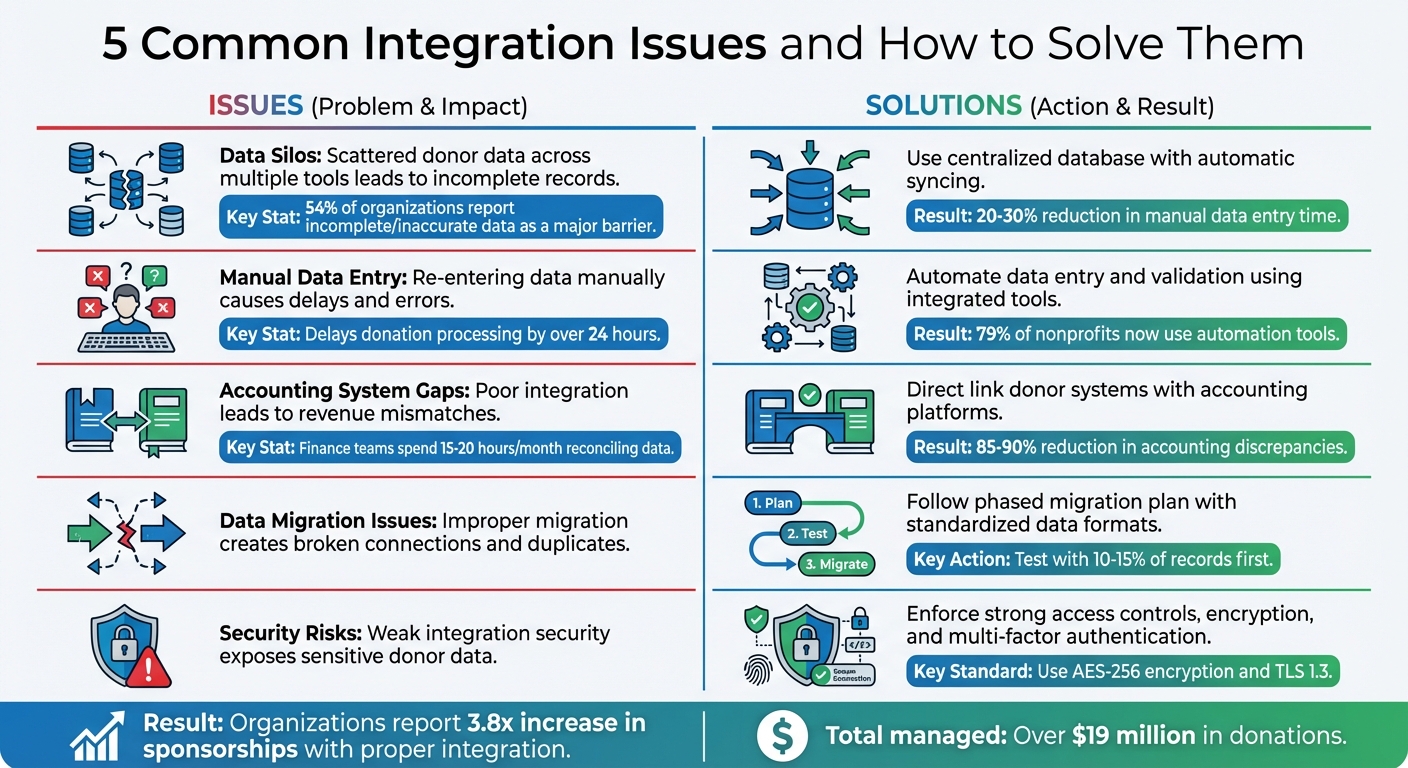
When nonprofits rely on disconnected systems, they face recurring challenges that waste time, create errors, and make donor management harder. Here’s a quick look at five common integration problems and their solutions:
- Data Silos: Scattered donor data across multiple tools leads to incomplete records. Solution: Use a centralized database with automatic syncing.
- Manual Data Entry: Re-entering data manually causes delays and errors. Solution: Automate data entry and validation using integrated tools.
- Accounting System Gaps: Poor integration with accounting software leads to revenue mismatches. Solution: Directly link donor systems with accounting platforms for consistent data.
- Data Migration Issues: Improper migration creates broken connections and duplicates. Solution: Follow a phased migration plan with standardized data formats.
- Security Risks: Weak integration security can expose sensitive donor data. Solution: Enforce strong access controls, encryption, and multi-factor authentication.
5 Common Nonprofit Integration Issues and Solutions
Data Silos and Inconsistent Donor Records
Problem: Scattered Data Across Multiple Systems
If your donor information is scattered across multiple platforms - one for email marketing, another for event registrations, and a separate one for accounting - you’re dealing with data silos. These isolated pockets of data make it nearly impossible to get a complete view of any donor’s relationship with your organization.
Imagine this: a donor makes an online contribution, attends an event, and subscribes to your email updates. But because their information is spread across disconnected systems, your team has to manually piece together their full history. This not only wastes time but also increases the chances of errors.
Here’s a startling fact: 54% of organizations report incomplete or inaccurate data as a major barrier to effectively using donor information. When systems don’t communicate, you risk ending up with duplicate records, outdated contact details, or missing donation histories. And that’s a big problem because 72% of people only engage with personalized messages. Without a unified view of your donors, delivering those tailored experiences becomes nearly impossible.
The solution? Centralizing your data to break down these silos.
Solution: Centralized Data and Automatic Syncing
The key to solving fragmented donor data is implementing a centralized database with automatic syncing capabilities. When all your donor information lives in one unified system, you eliminate the inefficiencies and errors caused by scattered data.
Start by designating one primary database as your go-to source for all donor information. This central repository should sync automatically with other tools, ensuring that updates made in one system - like a donor changing their email address in your event platform - are reflected everywhere.
"A proper API integration that transfers data from point A to point B is like a staff member that works 24/7 and follows your data standards perfectly every time".
For example, platforms like HelpYouSponsor consolidate donor records into unified profiles, keeping sponsorship details up-to-date. Organizations using tools like this have reported cutting manual data entry time by 20–30%, giving staff more time to build meaningful donor connections instead of wrestling with messy spreadsheets.
Designing smarter donor systems by centralizing and automating your data isn’t just a tech upgrade - it’s a game-changer for how you engage with your supporters.
Manual Data Entry and Error-Prone Processes
Problem: Manually Re-Entering Data from Online Forms
Manual data entry isn’t just tedious - it’s a breeding ground for errors and inefficiencies. When staff manually re-enter donation details from online forms into a donor management system, it often leads to duplicate records that scatter donor histories. This fragmented data creates headaches for your team and delays donation processing by over 24 hours, leaving donors waiting longer for receipts and your staff scrambling to fix mismatches.
Formatting mistakes like mismatched currency symbols, inconsistent date formats, or improperly entered donation amounts can throw off reporting and make seasonal trends harder to analyze. The problem worsens when nonprofits rely on separate tools for events, payments, and emails. Without integration, staff must copy data between systems manually, increasing the risk of errors like misspelled names or duplicate mailings. These issues not only slow down operations but also weaken donor trust and data reliability - making automation a necessity.
Solution: Automated Data Entry and Validation
Streamlining your workflow with automating your donor journey can eliminate manual re-entry altogether. By integrating online donation forms and payment platforms like Stripe or PayPal directly with your CRM, you can ensure data flows seamlessly.
Take Northwest Harvest as an example: they saved 12 hours per week on administrative tasks, freeing up time to focus on increasing recurring donations. Start by implementing field validation rules to catch incomplete or incorrectly formatted entries at the source. Dropdown menus with standardized options (e.g., "California" vs. "CA") can help maintain consistency. A data entry style guide ensures everyone on your team follows the same rules for formatting names, addresses, and dates.
The benefits are clear: 79% of nonprofits now rely on automation tools, cutting 20–30% of the time spent on manual tasks. Automation doesn’t just fix errors - it enhances integration across your donor management systems, allowing your team to focus on what really matters: strengthening donor relationships and advancing your mission.
"As social interactions have gone digital, donations have moved into the digital realm as well, making it imperative that nonprofits evolve their ability to accept those digital donations."
– Justin Wheeler, CEO and Co-founder, Funraise
Integration Gaps with Accounting Systems
Problem: Revenue Mismatches and Reconciliation Challenges
When donor management systems and accounting platforms don't communicate effectively, finance teams often find themselves spending 15–20 hours every month just reconciling data. This not only delays financial reporting but also leads to discrepancies between fundraising reports and the general ledger. The root of the issue lies in how these systems handle data differently - CRMs record pledges at the time of commitment, while accounting systems only recognize funds when they’re received. Without proper integration, every pledge adjustment, gift change, or designation update has to be entered manually. This process is prone to errors, which can snowball into compliance headaches and inaccurate financial statements.
The lack of alignment also creates tension between development and finance teams. Stu Manewith, Nonprofit Advocacy Director at Omatic Software, highlights the friction caused by disconnected systems:
"If your organization's shiny new best-of-breed database system... doesn't seamlessly connect with your financial system, you'll be left with a lot of interdepartmental drama".
On top of that, finance staff often have to manipulate exported data - editing CSV files, adding headers, or converting formats - just to make it usable. This inefficiency makes it difficult for leadership to get real-time insights into giving trends or fund allocations. Clearly, bridging the gap between these systems is not just about saving time; it's critical for accurate financial management and smoother team collaboration.
Solution: Direct Accounting Integration and Consistent Data Mapping
The answer lies in directly integrating donor management systems with accounting software like QuickBooks Online. This setup allows the fundraising platform to act as a subsidiary ledger that automatically syncs with the general ledger. By adopting this approach, organizations can reclaim those 15–20 hours per month and reduce accounting discrepancies by as much as 85–90%.
Daily synchronization between systems is a key step. Instead of waiting for a monthly reconciliation, frequent updates minimize errors and make it easier to spot and resolve issues. As Stu Manewith points out:
"Frequent posting to your general ledger results in additional transactions for reconciliation. However, it also reduces the opportunity for error and removes the 'needle in the haystack' syndrome".
To further streamline operations, establish a "Clean Data Checklist" that outlines procedures for managing conditional gifts and cutoff dates. Using class accounting features can also help track transactions by fund or initiative, offering a clearer view of financial health across various segments. With these practices in place, both development and finance teams can operate from a unified data set, reducing confusion and ensuring more effective financial oversight.
Data Migration and Field Mapping Challenges
Problem: Broken Connections After Data Migration
Moving donor data between systems isn’t as straightforward as it might seem. A rushed migration often leads to broken links between donor identities and donation histories, or the creation of duplicate records that fragment a supporter’s profile. The core issue lies in how different systems structure their data. Many older systems rely on free-form text fields, where information like phone numbers or addresses is stored inconsistently. In contrast, modern systems demand structured fields, which can create compatibility issues.
These mismatches in field mapping can cause a cascade of technical problems. Text might get cut off during the transfer, date formats may clash (think MM/DD/YYYY versus DD/MM/YYYY), and missing required fields can derail entire import batches. For organizations running sponsorship programs, the stakes are even higher - migrating data poorly can sever vital links between sponsors and the children they support, disrupting communication and eroding trust. When donor data is scattered across platforms like PayPal, QuickBooks, Mailchimp, or Excel, it becomes even harder to pinpoint the current, accurate donor record. The fallout? Hours of staff time spent fixing errors, duplicate mailings sent to donors, and leadership losing confidence in the accuracy of their reports. To tackle these challenges, a detailed, phased migration plan is essential.
Solution: Step-by-Step Migration Plan
To avoid migration pitfalls, treat the process as a phased project rather than a one-time task. Start with a comprehensive data audit. Identify every location where donor data is stored - whether in accounting software, email archives, or spreadsheets - and document how these records connect. This approach aligns with best practices for centralized data management, ensuring consistency throughout your integration strategy.
Before transferring any data, standardize it at the source. For example, convert all dates to MM/DD/YYYY format, ensure phone numbers follow a uniform structure like (555) 123-4567, and use matching algorithms to spot duplicates based on names, addresses, and emails.
Next, conduct a test migration with a small subset of your data - around 10–15% of records. Include a mix of scenarios, such as major donors, inactive contacts, and complex sponsorship relationships. This trial run will help identify mapping errors and truncation issues before you commit to the full migration. Once the test confirms everything is running smoothly, proceed with the full migration in incremental phases. Start with basic contact information, then move on to sponsorship relationships, followed by financial records, and finally communication logs. Each phase should take about two weeks, giving you time to verify accuracy before moving on.
Even after the migration is complete, don’t assume everything transferred perfectly. Compare donor counts, giving histories, and relationship mappings using side-by-side reports. Use tools like postal service databases to check addresses and email verification services to catch typos that could disrupt future communications. As Stu Manewith from Omatic Software explains:
"The goal of integration technology is not simply to move data back and forth... Omatic's integration philosophy is based on three key and equally important dimensions: Currency, Cleanliness, and Completeness".
Security, Privacy, and Access Control Issues
Problem: Unsecured Data Sharing
Every integration you add to your donor management system introduces a potential risk of exposing sensitive donor information. Connecting your platform to tools like email marketing software, accounting systems, or payment processors expands your data footprint - and with it, the number of potential vulnerabilities. The greatest threat often comes from third-party integrations not built by your core platform's vendor. These external connections might store API keys and credentials insecurely, leaving them vulnerable to attackers. Additionally, outdated patches, weak passwords, and insufficient login protections can create easy entry points for unauthorized access.
Regulations like GDPR and CCPA make it clear: organizations must know exactly what personal data they collect, where it resides across all connected systems, and who can access it. Without strong access controls, even one compromised integration could lead to a data breach. This not only violates privacy laws but also erodes donor trust and exposes your organization to legal consequences. As the Nonprofit Risk Management Center aptly states:
"Hackers can't steal data your organization doesn't possess".
Addressing these weaknesses is crucial to staying compliant and retaining donor confidence by aligning your programs with your mission.
Solution: Secure Integration Controls
Just as centralizing data and automating processes can improve efficiency, implementing strong security measures ensures these integrations don't become liabilities. By focusing on secure practices, you can protect donor data and maintain trust.
Start by enforcing role-based access control (RBAC) across all connected systems. This ensures staff members can only access the data necessary for their specific roles. For instance, your fundraising coordinator shouldn't have access to accounting records. Limiting access in this way reduces the potential damage if an account is compromised.
Make multi-factor authentication (MFA) mandatory for everyone accessing integrated systems. Passwords alone aren't enough - require an additional verification step, such as a mobile code or biometric scan, to enhance security. Additionally, use encrypted APIs to sync only the essential data. For maximum protection, rely on AES-256 encryption for data at rest and TLS 1.3 for data in transit.
Whenever possible, opt for first-party integrations provided by your core software vendor. These vendor-built connections often come with stronger security features. Regularly audit synchronization logs and system access records to identify unusual login attempts or unexpected data access patterns. As Mark Becker of Cathexis Partners puts it:
"Your technology stack isn't just an expense - it's a strategic engine that powers every donor relationship".
Avoiding Tech Regret: Platform Planning for Nonprofits
Conclusion
After examining the five major challenges - data silos, manual data entry, accounting gaps, migration struggles, and security risks - one thing is clear: disconnected systems create unnecessary hurdles. These integration problems force teams to spend more time on tedious tasks instead of focusing on their mission.
The solution? Centralization and automation. By consolidating donor profiles into a single, unified dashboard, you can streamline processes, boost efficiency, and improve security with features like PCI-compliant payment gateways and robust access controls. Platforms such as HelpYouSponsor make this possible by offering a comprehensive view of donor relationships, eliminating the need to juggle multiple tools. Organizations using these systems have reported an average 3.8x increase in sponsorships and have collectively managed over $19 million in donations.
As Stu Manewith, CFRE, Director of Thought Leadership and Advocacy at Omatic Software, puts it:
"The long-term impact of solid data integration is more funding for your mission – that's what it all boils down to".
When your systems function in harmony, you free up time and resources to focus on what truly matters: building lasting donor relationships to advance your mission. Integration done right isn't just a technical upgrade - it's a game changer for your cause.
FAQs
How can nonprofits avoid data silos and ensure seamless integration?
Data silos - those isolated pockets of donor, financial, or program information stored across separate systems - can seriously disrupt a nonprofit's workflow. They create fragmented reports, duplicate records, and waste valuable time as staff scramble to find accurate data. The good news? These challenges can be avoided by focusing on integration from the very beginning.
Start by taking stock of all your data sources. This includes donor databases, financial software, event management platforms, and any other tools your nonprofit uses. Next, set specific goals, like cutting down on manual data entry or standardizing donor records. A central CRM, such as HelpYouSponsor, can act as your single source of truth, bringing all your data together in one place.
Before migrating your information, make sure to clean it up. This means removing duplicates, standardizing formats (e.g., converting "12500" to "$12,500"), and ensuring field names are consistent across systems. Once your data is clean, automate syncing between platforms using APIs or middleware tools. Regular audits are also key to keeping everything accurate and up-to-date.
To keep silos from reappearing, establish clear data-governance policies. Decide who has the authority to update or delete records, and ensure your team receives training on how to use the unified system effectively. By combining a centralized platform with strong data practices and regular oversight, nonprofits can turn their information into a powerful tool for smarter decisions and better results.
What are the advantages of automating data entry in donor management systems?
Automating data entry in donor management systems brings several important advantages for nonprofits. First, it removes the need for repetitive manual tasks like recording donation amounts, updating donor contact information, and generating receipts. This not only cuts down on human error but also keeps donor records accurate and current. With clean and reliable data, nonprofits can segment donors more effectively and create personalized communications, which can lead to higher engagement and more repeat donations.
Second, automation saves both time and money. By reducing the hours spent on manual data entry, staff can focus on more impactful efforts, such as fundraising or delivering programs. This increased efficiency can also lower operational expenses, allowing the organization to allocate more resources toward achieving its mission.
Finally, automated systems offer real-time data insights. These tools help nonprofits track donor behavior, evaluate campaign performance, and plan strategies with greater precision. With up-to-date information readily available, organizations can make smarter decisions and achieve stronger results.
How can nonprofits protect donor data during system integrations?
Protecting donor data during system integrations requires a strong commitment to security. Nonprofits often manage sensitive details, such as personal and financial information, making it essential to safeguard this data to uphold donor trust and meet privacy regulations.
Start by sharing only the data that's absolutely necessary for the integration. Use encryption to secure all data transfers and implement token-based authentication to control access. Role-based permissions can further limit who can view sensitive information, while multi-factor authentication adds an extra layer of protection for admin accounts. Before syncing, always back up your data, and test integrations in a secure environment to ensure both accuracy and security.
Ongoing staff training and proactive monitoring are equally important. Educating your team on security best practices helps minimize mistakes, while monitoring tools can quickly identify and address potential risks. By following these steps, nonprofits can confidently integrate platforms like HelpYouSponsor while keeping donor information protected.