

Checklist for Effective Performance Audits in Nonprofits
Gratona
Performance audits ensure nonprofits are accountable, transparent, and focused on their mission. For child sponsorship programs, these audits confirm funds are allocated properly and used as promised. Here's a quick breakdown:
- Why Audits Matter: Build donor trust, meet compliance requirements, and reduce fraud risks.
-
Key Steps:
- Set clear goals (e.g., compliance, transparency, or evaluating fund use).
- Assemble a skilled team (audit coordinator, finance lead, program staff).
- Define the audit's scope and schedule (covering program impact, fund allocation).
- Prepare internal records (reconcile accounts, gather financial documents).
- Check internal controls (segregate duties, review approval processes).
- Analyze performance (measure program results, ensure donor funds are used correctly).
- Report findings (highlight issues, share reports with stakeholders).
- Take action (develop a Corrective Action Plan, test new controls).
- Tools and Tips: Use child sponsorship software to automate tracking, improve accuracy, and save time. Regular preparation and follow-up ensure smoother audits in the future.
An audit isn’t just a compliance task - it strengthens your nonprofit’s financial health and donor confidence. Start early, stay organized, and act quickly on recommendations.
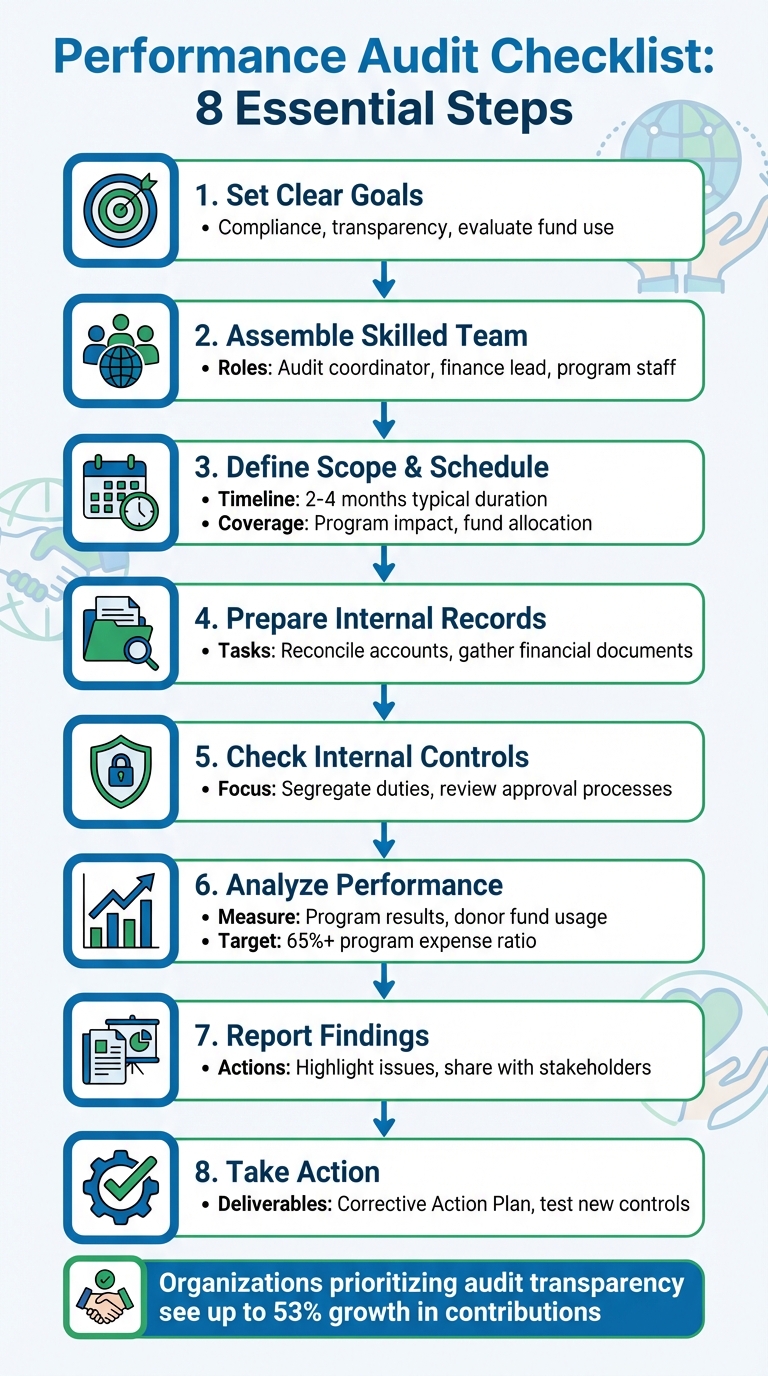
8-Step Performance Audit Process for Nonprofits
The Audit Roadmap Nonprofits Need: Tips Every Leader Should Know
Getting Ready for the Audit
Preparing for an audit is all about laying the groundwork for a smooth and productive process. When done right, it not only saves time but also strengthens donor confidence and ensures your nonprofit operates effectively. Many organizations face challenges during audits because they approach preparation as a last-minute rush rather than a structured plan.
Set Clear Audit Goals
Before diving into the audit, take the time to clearly define your objectives. These might include:
- Demonstrating financial transparency to your board and donors.
- Ensuring compliance with IRS regulations and grant restrictions.
- Evaluating internal controls to reduce fraud risks.
- Confirming that restricted funds are spent according to donor intentions.
Understanding why the audit is happening is key. Is it legally required, mandated by your bylaws, or triggered by grant funding (like meeting the $750,000 federal funding threshold)? Once you know the purpose, decide on the level of scrutiny needed: a full audit for detailed testing and a formal opinion, a financial review for limited assurance, or a compilation to organize your data without formal verification. A pre-audit checklist can also help you identify and resolve any discrepancies early, saving headaches down the road.
Once your goals are set, it’s time to assemble the right team.
Build Your Audit Team
The success of your audit often depends on having the right people involved. Your internal team should include:
- An audit coordinator to manage timelines and communication.
- A finance lead to handle financial statements and reconciliations.
- Program staff to provide grant documentation and impact data.
- Administrative support to organize documents and logistics.
Make sure you designate one person as the primary contact for the auditors to streamline communication.
For additional support, consider bringing in external experts, such as CPAs with nonprofit expertise or outsourced CFOs. These professionals can guide you through the preparation process, especially when dealing with complex areas like restricted funds or grant compliance. Choose team members who can offer objective insights and maintain a clear focus on the audit’s goals.
Once your team is ready, the next step is to define the audit’s scope and timeline.
Set the Audit Scope and Schedule
Clearly defining the scope and schedule of the audit helps keep the process on track. The scope should cover key areas like program impact, fund allocation, and shared costs across programs, administration, and fundraising. If your audit focuses on performance, include checks for fund restrictions and donor intent.
Most audits follow four main phases: Planning (understanding operations), Fieldwork (testing transactions), Reporting (compiling findings), and Follow-up (implementing recommendations). A typical financial statement audit takes between 2 and 4 months to complete. To avoid disruptions, begin preparations several months in advance. Schedule a pre-audit meeting with your auditors to clarify expectations around scope, goals, timelines, and documentation requirements.
One practical tip: implement a monthly close process where you reconcile every balance sheet account and payroll record. This habit ensures your year-end data is accurate and ready for review.
"The difference between a clean audit and a chaotic one often comes down to one thing: ongoing, intentional preparation." – Gene Godick, CEO of G-Squared Partners.
Review Internal Records and Documents
Once your team and timeline are set, it's time to ensure your records and documents are complete and accurate. Proper documentation is the backbone of any successful audit. Without it, the process can slow down or lead to unreliable results.
Balance All Accounts
Start by reconciling all balance sheet accounts - this includes checking and savings accounts, credit cards, payroll, accounts receivable, and accounts payable. Make it a habit to reconcile these accounts monthly. Doing so helps you catch mistakes early, spot stagnant balances, and confirm that your general ledger aligns with your bank statements. Additionally, cross-check payroll totals against Form 941 to verify that wages reported to the IRS match your internal records. Be sure to review post–year-end check registers to account for any pending accruals.
"A subsequent check register is always requested on a financial statement audit to search for unrecorded liabilities at year-end. We strongly recommend doing this search yourself to ensure you have all the proper accruals." – Sarah Reter, CPA | CFO Advisor, SC&H Group
Gather Required Documents
Auditors will need a variety of documents to assess your organization's financial health and compliance. Prepare a PBC (Prepared by Client) list that includes:
- General ledger and trial balance
- Bank and credit card statements, along with reconciliations for the fiscal year
- Accounts receivable and accounts payable aging reports
- Fixed asset schedules with depreciation calculations
- Investment statements
For governance, gather key documents such as your Articles of Incorporation, bylaws, IRS Determination Letter, and minutes from board and committee meetings. Don’t forget grant agreements, award letters, donor restriction records, and proof of compliance with funding terms. Payroll registers, W-2s, 1099s, vendor invoices, and records of in-kind contributions should also be included. Storing these documents digitally can make it easier for auditors to access them.
Check Internal Controls
Internal controls are your organization’s safeguard against fraud, mistakes, and inefficiencies. Review your segregation of duties to ensure no single person has control over an entire transaction. For example, the person approving invoices shouldn’t also be reconciling the related accounts.
Also, evaluate your authorization and approval processes for large purchases or sensitive data. Make sure written policies for budgeting, expense reimbursements, and data management are in place and consistently followed. Restrict access to financial systems based on job roles, and document who has the authority to make changes. These steps create a system of checks and balances, helping you spot and resolve issues before they become significant problems.
Analyze Performance and Data
Once you’ve established accurate records and solid internal controls, the next step is to dive into performance analysis. This is where raw numbers turn into meaningful insights about how well your programs are working and how responsibly funds are being managed. Here’s a breakdown of how to evaluate program results, ensure donor funds are used correctly, and take advantage of technology to streamline the process.
Measure Program Results
Start by comparing your original goals with the actual outcomes. For instance, if your objective was to improve reading proficiency by 15 points among 150 students by May 2026, evaluate whether you hit that target. Focus on key metrics like goal achievement rates, retention and dropout numbers, and even beneficiary satisfaction. These metrics go beyond just counting activities (like the number of sessions held) and instead highlight the real-world changes your programs are making.
Check Donor Fund Usage
Make sure donor contributions are being used as promised. One way to do this is by using separate accounting codes for restricted funds, which helps prevent mixing them with general operating cash. Review donor agreements carefully, calculate the program expense ratio (aim for at least 65%, as recommended by the Better Business Bureau's Wise Giving Alliance), and assess the fundraising efficiency ratio. For example, if your ratio is 0.20, it means you’re spending 20 cents to raise every dollar - an indicator of strong efficiency.
Use Software for Data Analysis
Relying on manual methods for data analysis can lead to errors and inefficiencies. Instead, consider nonprofit software tools like HelpYouSponsor. These systems automate tasks like reconciliations, deliver real-time insights, and cut processing time by up to 75%. They also categorize income and expenses by program or restriction level, which can improve efficiency by 40%. This frees up your team to focus on what matters most - achieving your mission.
Report Findings and Take Action
An audit only brings value when its findings lead to meaningful changes. This phase focuses on turning audit insights into practical steps that enhance your organization's financial stability and build trust with stakeholders by aligning programs with your mission.
Write and Share the Audit Report
Your audit report should pull together the data to highlight areas of compliance and pinpoint where improvements are needed. Be sure to include material findings that reveal significant issues in financial reporting or internal controls. For example, weaknesses like poor segregation of duties or insufficient approval processes should be clearly detailed. Before presenting the report to your board, have it reviewed by your audit committee, executive director, and senior financial staff to ensure accuracy and prepare for any follow-up questions.
When presenting the findings, keep in mind that the board's role is to "accept" the auditor's report, not to "approve" it. This distinction reflects the independence of the audit process. As the National Council of Nonprofits explains:
"The findings in the report are not subject to change by the board after the report is submitted to the board, consequently, the board's action is not to approve/disapprove, but to accept the report".
To demonstrate transparency, post your annual audit report on your website. Additionally, share audited financial statements with major donors and grant-makers, as many require these documents for funding renewals. Use the insights from the report to take immediate corrective action where needed.
Create an Improvement Plan
Right after the audit, develop a Corrective Action Plan (CAP) with clear deadlines and assigned responsibilities. Start by categorizing issues based on their severity - focus first on compliance issues, significant control weaknesses, and errors that affect financial accuracy. Work closely with relevant departments to uncover the root causes of these issues instead of just addressing surface-level symptoms. Gaining leadership support is critical to ensure the plan's success.
Jon Osterburg, COO at Jitasa, highlights the importance of acting swiftly:
"What truly matters isn't how many recommendations your auditor makes - it's how quickly you act on them and how dedicated you are to improving your organization's processes".
Once the CAP is in place, test new controls to ensure they resolve the identified issues. Maintain a "Prepared by Client" (PBC) folder on your network to store all documents submitted to auditors. This will serve as a valuable reference for future audits. Taking these steps now sets the stage for smoother audits down the line.
Plan Future Audits
Shift from a reactive approach to a state of continuous audit readiness. Schedule future audits ahead of time to monitor progress and keep performance and transparency on track. Build on the improvements you've implemented by maintaining a regular audit cycle. Assign a knowledgeable staff member to handle auditor communications, ensuring consistency and efficiency. Share audit results with employees to help them understand how the findings impact their roles and responsibilities.
Finally, view your auditors as partners. They can offer valuable guidance based on best practices they've observed in other organizations. By fostering this collaborative relationship, you'll be better positioned to strengthen your organization's financial oversight over time.
Conclusion
Performance audits foster a culture of openness and continuous improvement, strengthening your organization from within. The process starts long before the auditor arrives, requiring careful preparation, well-organized documentation, and a committed team. It continues with detailed data analysis to assess whether your programs are delivering meaningful results. But it doesn’t stop there - acting on the audit findings promptly is what drives real, lasting change. This entire process - preparation, analysis, and follow-through - lays the groundwork for integrating technology effectively.
For nonprofits, embracing transparency through regular audits can lead to tangible benefits. In fact, organizations that prioritize this can see contributions grow by up to 53%.
Technology has completely reshaped how audits are handled. What was once a stressful, annual rush can now become a streamlined, year-round effort. Tools like HelpYouSponsor simplify the preparation process by automatically sorting restricted and unrestricted funds, generating FASB-compliant financial statements, and centralizing audit trails. With features like automated reconciliations and real-time dashboards, your team can cut month-end close times by 50% to 70%, addressing issues before they snowball. These tools also make it easier to act on audit recommendations and prepare for future cycles.
Think of your audit as more than just a compliance requirement - it’s a strategic investment in your organization’s growth. Keeping accurate records year-round, addressing past recommendations promptly, and collaborating with auditors as partners builds the trust you need to secure funding and fulfill your mission. As Peter Drucker wisely said:
"What gets measured gets managed".
FAQs
How do I choose the right audit scope for my nonprofit?
Start by identifying why you're conducting the audit and the specific areas you need to review. Key factors to consider include regulatory compliance, grant requirements, board oversight responsibilities, and any unusual financial activity.
To narrow your focus, examine your financial statements, internal controls, and compliance documentation. This will help you spot areas that require closer attention.
A well-defined audit scope ensures your audit effectively addresses risks, aligns with your objectives, and satisfies regulatory obligations.
What documents do auditors usually ask for first?
Auditors usually ask for important organizational documents, policies tied to financial management, and financial records like bank statements, ledgers, and tax returns. Having these ready beforehand can simplify the audit process and make the review more efficient.
How can HelpYouSponsor make audit prep faster?
HelpYouSponsor simplifies the audit preparation process by automating tasks and organizing reports, which cuts down on manual effort and minimizes errors. By keeping financial records accurate, maintaining solid internal controls, and ensuring documentation stays well-organized throughout the year, audits become much less stressful. The platform also centralizes sponsorship, fundraising, and donor data, making it easy to access when needed - no more last-minute chaos or delays in getting audit-ready.