
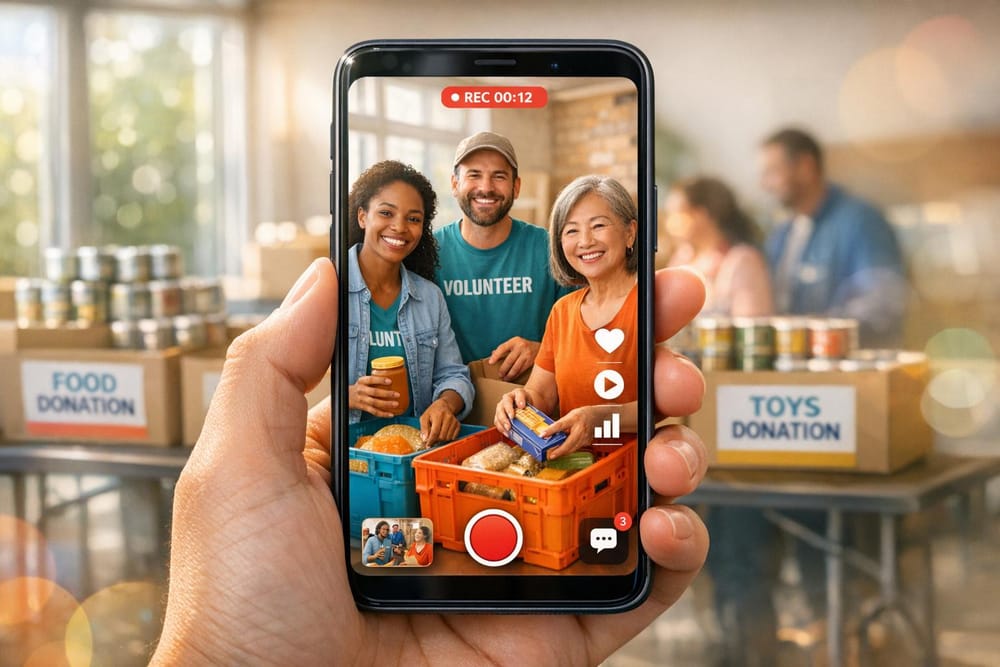
Ultimate Guide to User-Generated Visuals
Gratona
User-generated visuals - photos, videos, and stories shared by donors, volunteers, beneficiaries, and supporters - are a powerful tool for nonprofits. These visuals feel more real than polished marketing materials, helping organizations connect with their audience. Here's why they matter:
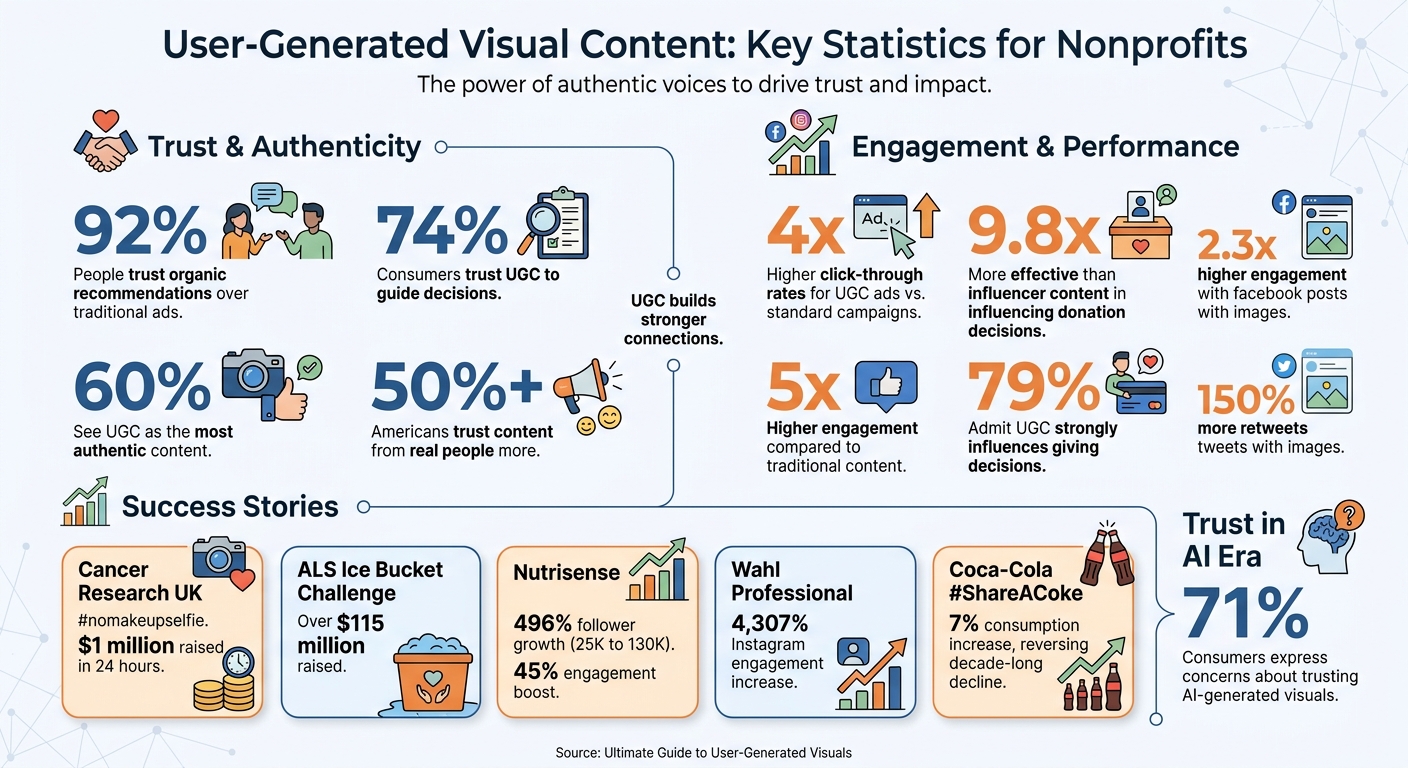
- Trust-building: Over 50% of Americans trust content from real people more than from organizations.
- Higher engagement: These visuals drive click-through rates 4x higher than influencer content.
- Cost-effective: They eliminate the need for expensive professional shoots.
Examples include photos of sponsored children, videos from volunteers, or before-and-after transformations. To use these effectively, nonprofits should:
- Collect content: Encourage submissions via hashtags, contests, or portals.
- Manage permissions: Always get explicit consent before sharing.
- Organize visuals: Use tools like Google Drive to store and categorize content.
User-generated visuals work across websites, social media, email, and even reports. They’re especially effective in measuring impact, inspiring fundraising strategies, and building community connections. By balancing raw visuals with light branding, nonprofits can create content that resonates deeply with their audience.
User-Generated Content Impact Statistics for Nonprofits
Boost Donations with User-Generated Content: A Guide for Nonprofits
What Is User-Generated Visual Content
User-generated visual content includes any visual material created by individuals outside your nonprofit’s marketing team. Think of donors snapping photos at events, volunteers filming moments during field visits, beneficiaries sharing their personal progress, or sponsors posting about the children they support.
For child sponsorship programs, this content can highlight impact in a way that polished marketing materials often can’t. For example, a sponsor sharing a photo of themselves reading a letter from their sponsored child or a volunteer posting behind-the-scenes footage from a school visit brings a sense of authenticity. These genuine moments build trust and show real results. Now, let’s dive into the types of visuals that resonate most with audiences.
Types of User-Generated Visuals
User-generated visuals come in many forms, each with its own storytelling advantages. Here are some key types:
- Impact stories: These capture beneficiaries’ progress, like a photo series showing a child’s educational growth over a year.
- Volunteer and behind-the-scenes content: Think group photos from a community project or a video diary from a mission trip.
- Donor and sponsor content: Examples include sponsors holding signs with their sponsored child’s name or families wearing branded t-shirts at charity events.
- Before-and-after series: These visuals document transformation, such as a classroom going from bare walls to a vibrant, fully equipped learning space or an empty lot becoming a flourishing community garden.
- Visual testimonials: Short videos or images featuring quotes from volunteers and beneficiaries sharing their experiences.
- Peer-to-peer fundraiser content: Supporters raising money on your behalf - like marathon runners posting training updates or birthday fundraisers explaining why they chose your cause.
There are also standout examples of user-generated content sparking massive engagement. In March 2014, Fiona Cunningham launched the #nomakeupselfie trend on Twitter to raise awareness for cancer. Cancer Research UK embraced the movement, raising $1 million in just 24 hours. Similarly, the ALS Ice Bucket Challenge generated over $115 million for the ALS Association through viral user-made videos.
Why User-Generated Visuals Work
So, why do these visuals resonate so strongly? It boils down to three key factors: authenticity, social proof, and cost efficiency.
-
Authenticity: Real, candid visuals build trust and foster deeper connections. As Raphael Shinners, Head of Communications at Copalana, explains:
"Authenticity brings humanity to your brand, which builds connection and community."
- Social proof: Seeing others actively engaged with your nonprofit inspires others to join in. It’s a powerful motivator for potential donors and volunteers.
- Cost efficiency: User-generated visuals eliminate the need for expensive professional shoots. Community-sourced content, often captured on smartphones, provides a steady stream of genuine material while freeing up funds for direct program work.
For example, the nonprofit Love Button uses Instagram Stories to feature user-generated content from its community. By showcasing followers’ personal experiences, they seamlessly weave these moments into their official narrative, boosting engagement and driving donations.
Building Your Visual Content Library
Understanding the value of user-generated visuals is just the start. The next step is creating a system to collect, organize, and manage these assets efficiently. A well-organized library ensures you can quickly access and reuse content whenever needed. Here’s how to build and maintain this system.
How to Collect Content
Make it easy and worthwhile for people to share their visuals. Encourage submissions through unique hashtags like #MySponsorshipStory, contests, or a dedicated submission portal. For example, you could host a photo contest where sponsors share images of letters from their sponsored children or ask volunteers to showcase memorable moments from recent mission trips. Always include a mandatory checkbox in submission forms to ensure you have the legal right to use the content.
Consider using tools like Typeform or Airtable to create a dedicated portal. These platforms provide a simple way for ambassadors, volunteers, and sponsors to upload high-quality visuals. Be clear about technical requirements upfront - such as minimum image resolution or video length - to ensure submissions meet your standards.
Keep an eye on branded hashtags and mentions through social listening tools. When you find a compelling visual, reach out directly with a friendly message asking for permission to feature their content.
To encourage participation, offer small incentives like branded merchandise, exclusive updates, or a feature in your newsletter. It’s worth noting that user-generated content is 9.8 times more effective than influencer content when it comes to influencing donation decisions.
Managing Permissions and Rights
Always obtain explicit permission before using user-generated content, even if it’s shared publicly with your hashtag. This protects your organization from potential legal issues and ensures you’re respecting content creators’ rights.
For formal submissions - like those collected through contests or portals - include a Terms and Conditions checkbox that grants usage rights. Whether it’s a signed release form or a checked box, this explicit consent is your strongest legal safeguard.
It’s also important to respect the original context of visuals. Avoid altering testimonials or cropping images in ways that could misrepresent the creator’s intent. This approach not only builds trust but also strengthens your relationship with your community and supports nurturing lasting donor relationships. Whenever possible, credit creators by tagging their social media handles when featuring their content.
Keep records of permissions alongside the visuals for easy reference and verification.
Setting Up a Central Storage System
Once you’ve secured permissions, store all approved content in a centralized library. This prevents visuals from getting lost in email threads or scattered across devices. Platforms like Google Drive, cloud storage, or dedicated UGC management tools work well for this purpose.
To make your library functional, focus on tagging and categorization. Organize visuals by campaign name, content type, format, and marketing goal. For example:
| Categorization Level | Examples | Purpose |
|---|---|---|
| Campaign/Goal | #GivingTuesday2026, Awareness, Conversion | Link content to specific objectives |
| Content Format | Photo, Short Video, Testimonial | Match format to various channels |
| Source | Instagram, Email Submission, Event | Track where content originated |
| Rights Status | Approved, Pending, Denied | Ensure compliance with usage rights |
Use bulk tagging features to save time when processing multiple submissions.
Finally, establish a moderation workflow. New submissions should go through review stages to ensure they align with your brand’s values and messaging before being approved for public use. This step ensures quality while maintaining consistency in your communications.
Using Visual Content Across Your Channels
Leverage user-generated visuals to create stronger connections and inspire action. Placing these visuals strategically can reshape how people engage with your mission. Here’s how to make the most of these genuine visuals across various platforms.
Website and Online Presence
Your website is often the first interaction potential donors and supporters have with your organization. User-generated visuals help build trust and resonate with a wide audience.
Instead of relying on stock images, feature candid photos of volunteers at work or beneficiaries sharing their stories. These real-life moments create a human connection that polished, professional photos often lack. Adding supporter stories and images to your blog can further personalize your mission, making it relatable and impactful.
Consider embedding live social media feeds on your homepage or key pages using tools for platforms like Twitter/X or Facebook. This keeps your site fresh and interactive, showing real-time engagement from your community. Include social sharing buttons near visuals with clear calls-to-action, such as "Share Your Story" or "Post Your Experience", to encourage further participation.
On program and donation pages, user-generated visuals can make a big difference. They’ve been shown to boost conversion rates. To ensure accessibility, always include descriptive alt text for images and use high-contrast text overlays. These steps not only make your content inclusive but also reinforce your organization’s mission and values.
Social Media and Email
Tailor your visual content to fit each platform’s unique style and audience. For example, Facebook posts with images see 2.3 times higher engagement compared to text-only posts, and tweets with images get 150% more retweets.
Use a mix of formats: multiple images for storytelling on Facebook, GIFs for quick emotional impact on Twitter, and short, authentic videos for Instagram Reels. Always tag the original creators when reposting their content to give credit and strengthen community ties.
In email campaigns, visuals can make a big impact. Include donor photos in newsletters or feature visual testimonials in donation reminders. This personal touch fosters trust and relatability while nurturing lasting relationships with your supporters. User-generated visuals in ads are also highly effective, achieving four times higher click-through rates compared to traditional ads. Whether on social media or email, staying consistent with your branding and accessibility guidelines ensures your message reaches everyone.
These tactics not only increase engagement but also set the groundwork for impactful storytelling in reports and events.
Reports and Events
Authentic visuals aren’t just for digital platforms - they can enhance offline communications as well. Annual reports and event presentations, for example, benefit greatly from real-life visuals. Use before-and-after photos or progress graphics to highlight milestones and results clearly. Short video interviews with beneficiaries or volunteers can evoke emotions that numbers alone can’t convey.
At in-person events, incorporate smartphone-captured photos and videos into your presentations to showcase your mission in action. Create opportunities for attendees to capture and share moments, such as photo walls or branded backdrops. Encourage them to use unique hashtags, making it easier to track and collect content for future use.
Even when using raw visuals in formal reports, maintain a cohesive look by including your logo, brand colors, and consistent typography. Always obtain permission before using someone’s content in public presentations, and add captions to videos to ensure accessibility. By weaving these authentic visuals into your reports and events, you can vividly illustrate the real-world impact of your mission.
Balancing Quality and Authenticity
Striking a balance between polished messaging and raw authenticity can elevate your nonprofit's Instagram storytelling. But this isn't about choosing one over the other. With 71% of consumers expressing concerns about trusting AI-generated visuals, unpolished, raw content often feels more genuine to audiences. Elements like shaky camera work, natural lighting, and unscripted reactions aren't imperfections - they're what make user-generated content (UGC) relatable and trustworthy.
In fact, 60% of consumers see UGC as the most authentic form of content, and 84% say they trust a brand more when it incorporates user-generated visuals. Even more compelling, 79% admit that UGC has a strong influence on their giving decisions. As Rickie Sherman, UX Lead at Averi, explains, this shift in audience expectations requires nonprofits to establish clear yet flexible sponsorship guidelines. The goal isn't to over-polish content but to provide just enough structure to align with your mission while keeping the authenticity intact. Raphael Shinners, Head of Communications at Copalana, sums it up perfectly:
"Audiences often connect more with real, authentic content than overly curated visuals".
The real challenge lies in creating guidelines that make it easy for contributors to participate while ensuring their content retains value and aligns with your brand.
Setting Guidelines for Contributors
To make the most of UGC's authentic appeal, provide contributors with simple, actionable guidelines. Ditch lengthy style manuals and instead offer specific storytelling frameworks. For example, encourage contributors to create content like "before-and-after" series that highlight program impact, visual testimonials from beneficiaries, or "day-in-the-life" diaries from volunteers. These formats guide contributors toward high-value content while leaving room for creativity.
Here are a few practical tips to share with contributors:
- Use high-resolution settings for better-quality visuals.
- Add text overlays with high-contrast colors for readability.
- Include alt-text to ensure accessibility.
This approach has proven effective. Between July 2021 and December 2022, Nutrisense partnered with Sprout Social to amplify user-generated visuals. The result? A community that grew from 25,000 to over 130,000 followers - a whopping 496% increase - and a 45% boost in social media engagement.
Branded hashtags are another great tool to streamline participation and track content. For instance, since June 2015, Wahl Professional has monitored hashtags like #Wahl and #WahlPro to curate content from stylists and barbers. This strategy led to a 4,307% increase in Instagram engagement and added 84,788 followers. It’s worth noting that only 52% of customers want companies to dictate exactly what content to create, so keep your guidelines flexible.
Maintaining Brand Consistency
While authenticity is key, a touch of branding can reinforce your message without overwhelming the content. Add subtle branded elements like your logo, text overlays in your brand's color palette, and consistent typography . Tools like Canva make it easy to integrate these elements while keeping the original look intact.
Take Coca-Cola's #ShareACoke campaign as an example. By inviting users to share photos of personalized Coke bottles with minimal instructions, the campaign generated millions of shares and boosted consumption by 7%, reversing a decade-long decline.
You can also encourage contributors to naturally include your nonprofit's branded merchandise - like t-shirts, stickers, or other swag - in their photos. This maintains visual consistency while keeping the content spontaneous. And don’t forget to prioritize accessibility by using high-contrast colors and adding captions to videos.
Measuring Visual Content Performance
Once you’ve built a well-organized visual content library and implemented multi-channel strategies, the next step is tracking performance. This helps you fine-tune your approach and identify what’s working. Metrics like engagement - including likes, comments, shares, and saves - provide insight into how well your content resonates with your audience. On the other hand, conversion metrics such as click-through rates (CTR), sign-ups, and donation totals reveal whether your audience is taking meaningful action. For instance, a 2% click-through rate is often considered a solid benchmark for user-generated content (UGC) campaigns.
Qualitative feedback also plays a role. Tools like AI-powered sentiment analysis can track the tone of comments in real time , similar to how AI tools for nonprofits streamline communication, flagging potential brand safety issues before they escalate. Meanwhile, awareness metrics - such as reach (unique accounts) and impressions (total views) - help gauge how widely your message is spreading. Combined with UGC’s ability to drive 5× higher engagement than traditional content, these metrics highlight areas for growth and improvement. Below, we break down the key categories for measuring performance.
Metrics That Matter
Performance metrics can be grouped into four main categories:
- Engagement: Likes, comments, shares, and saves
- Conversion: Donation totals, sign-up rates, and CTR
- Awareness: Reach, impressions, and hashtag usage
- Quality: Sentiment score and brand alignment
Sarah Handley, Marketing Director, emphasizes the importance of UGC in building connections:
"User-generated content brings authenticity. People connect through stories, and every shared story is a piece of our mission".
With 74% of consumers trusting user-generated content to guide their decisions, these metrics allow you to identify which stories resonate most. From here, tracking tools and methodologies can further refine your insights.
Tracking and Improving Results
To track performance effectively, use UTM parameters to monitor which visuals drive traffic. Tag every link with source, medium, and campaign names using consistent, lowercase naming conventions to avoid fragmented data. Setting up real-time dashboards also helps you quickly spot technical issues.
For a more accurate picture of your campaign’s impact, adopt multi-touch attribution instead of last-click models. This approach credits all touchpoints in a donor’s journey, ensuring that awareness-building efforts aren’t overlooked. Platforms like TikTok Shop and Instagram Reels now include native tools for tracking direct conversions within the app, simplifying the process.
If content underperforms, AI analytics can identify problem areas and predict which visual styles might perform better based on historical data. Finally, calculate your donor acquisition cost (CPA) using this formula:
Total Campaign Costs ÷ Number of New Donors.
This calculation reveals how efficiently your user-generated visuals are converting audiences into supporters, helping you optimize future campaigns.
Conclusion
User-generated visuals offer nonprofits a powerful way to build trust, broaden their reach, and inspire action while keeping costs low. With 92% of people trusting organic recommendations over traditional ads, and UGC-based ads delivering 4 times higher click-through rates compared to standard campaigns, the benefits are hard to overlook. These visuals bring your mission to life, transforming abstract goals into relatable, emotional stories that resonate with supporters.
To make the most of this approach, start by crafting a clear visual content strategy. Define your goals - whether it’s boosting donations, attracting volunteers, or spreading awareness - and pinpoint your target audience and desired outcomes. A branded hashtag can help centralize submissions, while a dedicated collection system ensures all incoming content stays organized and accessible.
Remember, authenticity wins over perfection. Candid, real-life visuals from your supporters often create deeper emotional connections than highly polished content. These genuine moments act as powerful social proof, encouraging others to engage.
Always secure explicit consent before using any content, and recognize contributors to maintain trust. Acknowledging those who share their visuals not only strengthens relationships but also motivates others to participate, fostering a stronger, more connected community.
FAQs
What’s the fastest way to get permission for user photos and videos?
The fastest way to get permission for using user photos and videos is by asking for explicit consent directly from the people involved. Keep the communication clear and easy to understand. Digital tools designed to simplify approval workflows can make the process quicker while staying compliant with legal and ethical standards. Make sure individuals fully understand how their images will be used before they agree.
How do I keep UGC authentic while still looking on-brand?
To keep user-generated content (UGC) feeling real while staying true to your brand, focus on showcasing genuine, unpolished experiences from your audience. Share authentic customer stories along with their photos and videos, steering clear of heavy editing or overly scripted material.
Encourage natural contributions that fit your brand's voice. By staying true to the original tone and prioritizing authenticity, you'll build trust and ensure the content complements your brand's identity effortlessly.
Which metrics best show if UGC is increasing donations?
Tracking the right metrics is essential to understanding the impact of user-generated content (UGC) on your nonprofit. Engagement rates reveal how actively supporters interact with your content, while indicators of trust and authenticity help gauge how credible and relatable your organization appears to potential donors. Additionally, social proof - like testimonials and supporter-created content - can showcase the real-world impact of your cause, influencing donor behavior and strengthening your nonprofit’s reputation.